Script Panel Free · Adobe Illustrator Your first useful scripts. Within reach.
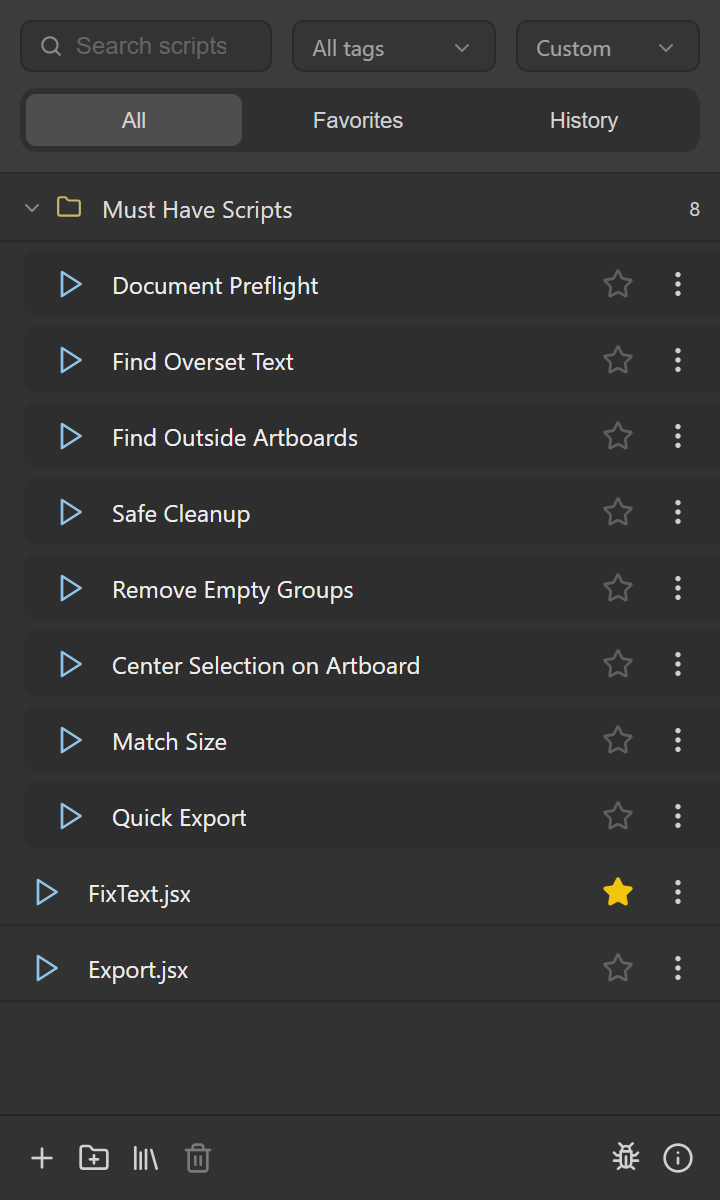
Run local Adobe Illustrator scripts from a dockable panel. Script Panel Free includes 8 Must-Have Scripts, with no account or subscription.
Free edition · Adobe Exchange offer
Acquisition depends on current listing and region. Check exact listing for its latest regional availability.
What it does
Script Panel Free, explained.
Script Panel Free is a dockable Adobe Illustrator panel for running local .jsx, .jsxbin and .js scripts. The current 0.1.2 source bundle includes eight Must-Have Scripts for inspection, cleanup, arrangement and export. Free does not include the Pro library-management tools.
Who it is for
Designers who want a compact launcher and practical starting scripts before deciding whether they need a larger script library.
The useful part of the workflow.
Inspect
Document Preflight, Find Overset Text and Find Outside Artboards help locate document issues.
Clean
Safe Cleanup and Remove Empty Groups address specific cleanup candidates. Read each script’s controls before changing a document.
Arrange
Center Selection on Artboard and Match Size act on a selection with explicit settings.
Export
Quick Export handles selection or artboard output to PNG or SVG. It is distinct from a multi-preset batch exporter.
From installation to a first useful run.
- Acquire the Free edition from its Adobe Exchange listing and complete installation.
- Restart Adobe Illustrator and open the Script Panel Free entry under Window > Extensions.
- Open a suitable document and select the objects required by the chosen script.
- Choose a script, run it and review its result or message before continuing.
Know the limits
Search, tags, favorites, run history, folders and advanced library controls are Pro features. A launcher does not change the requirements or side effects of the scripts it runs. Keep a saved copy of artwork when using scripts that modify it.
Acquisition depends on current listing and region. Check exact listing for its latest regional availability.
Free or Pro?
| Task | Free | Pro |
|---|---|---|
| Local script execution and starting scripts | 8 included scripts | Included; confirm acquired build |
| Search, tags, favorites and history | Unavailable | Included |
| Folders, sorting and advanced library controls | Unavailable | Included |
| Current public price | Free | $29 USD once |
Version 0.2.1 · Free and Pro
New versions, within reach.
Automatic version checks let you know when a new panel release is available, without searching for installers.
Website installations
On Windows, confirm the update and let it download in the background. Installation waits until you close Adobe Illustrator. Your scripts, library and settings stay in place. macOS website updates use a manual signed-ZXP installation.
Adobe Exchange installations
The panel checks the published Exchange version and opens the matching listing. Creative Cloud handles installation. You choose when to close Adobe Illustrator.
Version 0.2.1 is available to download now. Installations older than 0.2.0 need one manual update; from 0.2.0 on, updates are offered inside the panel. The panel does not close Adobe Illustrator for you.
Script Panel Free · Current presentation
See the panel in your workflow.
View the other six slides
Script Panel Free at a glance.
| Price | $0, no account and no card |
|---|---|
| Where to get it | Download on this site or get it on Adobe Exchange |
| Current version | Website 0.2.1 · Adobe Exchange 0.1.2 |
| Works with | Adobe Illustrator 21.0 or later, Windows and macOS |
| Install | Installation guide |
| Updates | The panel shows a badge when a new version is out; website downloads update from this site, Exchange copies through Creative Cloud |
| Help | Support · All prices · support@script-panel.com |
Questions before you install.
Is Script Panel Free a trial?
The Free edition has no subscription and is a separate free offer. Its feature set differs from Pro.
Does Free include search and favorites?
No. Those controls may appear in the shared interface, but the Pro features are unavailable in Free.
Do I need an online account to run scripts?
No separate Script Panel account is required for local script execution. Acquiring a panel through Adobe Exchange follows Adobe’s own account and installation process.
Put it to work.
Install a trusted .jsx into Illustrator’s Scripts folder for the File > Scripts menu, or run once with Other Script. Restart after copying.
Get the right panel from Adobe Exchange, let Creative Cloud install it and open it in Illustrator. Fix a missing panel without changing security settings.